
PQM Training Help
PQM Training / Help and PQM Training
Support Center
Help and PQM Training
Find documentation, role guides, FAQ, support path and practical onboarding instructions.
Production OSWordPress CoreRole-based workflowTraining Center
Training pages
Training HomeProduction DashboardCore ConfigurationTasks and Add TaskDepartments and WorkflowCalendar and Standard GanttEmail Queue and CommunicationReports and KPIModules / MarketplaceSetup WizardLicense and Demo ModeHelp and TrainingAdmin PanelClient PanelEmployee Worker PortalShop Manager / SupervisorImplementation Checklist
Purpose in plain language
Help and Training is the safe guidance area for users who do not know what to click next. It should collect documentation, training lessons, support links, setup instructions and quick explanations of the most common screens.
For a beginner, this page should reduce fear. If the user is lost, they should open Help and find a clear path: setup, create task, manage production, communicate, report and troubleshoot.
Where to click
Open the PQM admin menu.
Click Help, Training or Documentation.
Choose a topic: setup, tasks, departments, email, reports, portals or license.
If the Help page links to external documentation, open it in a new tab so the user does not lose current work.
Use the implementation checklist before going live with real production.
What Help should contain
| Help area | Purpose | Beginner expectation |
|---|---|---|
| Quick start | Shortest route from install to first task. | “Tell me what to click first.” |
| Training pages | Longer lessons with screenshots and examples. | “Explain the screen like I am new.” |
| Role guides | Separate guidance for admin, manager, worker and client. | “Show me only what matters for my role.” |
| FAQ | Common questions and problems. | “Why is my task/report/email not visible?” |
| Support / contact | Where to get help if documentation is not enough. | “How do I contact support and what information should I send?” |
| Version / changelog | What changed in recent versions. | “Did this feature move or change?” |
What to prepare before asking support
Write the exact screen name where the problem appears.
Write what you clicked and what you expected to happen.
Take a screenshot that includes the error or empty state.
Mention current role/user type: administrator, manager, employee, client.
Mention whether the site is staging/test or production.
For technical issues, include plugin version, WordPress version, active modules and any error log if available.
Mini FAQ for beginners
| Question | Answer |
|---|---|
| Where do I start after installation? | Run Setup Wizard, then create a test task, then check dashboard and task list. |
| Why do reports look empty? | Usually there is no data in the selected date range or tasks do not have the status/date required by the report. |
| Why does a worker not see tasks? | The user may not be assigned to the correct department or role/capability. |
| Why did the customer not receive an email? | Check recipient address, email queue status and WordPress/SMTP mail configuration. |
| Can I use PQM without WooCommerce? | Core task workflow can be independent depending on build; WooCommerce integration is useful when online orders should become tasks. |
Good practice
- Write help content for the newest employee, not for the developer.
- Use consistent screen names. If the menu says “Tasks”, do not call it “Jobs” in help text unless you explain the difference.
- Keep help linked from every complex area.
- Update Help after every major UI change, not only after code changes.
Screenshot reference
How to use screenshots
Click any screenshot to open it in a new tab. This is useful for zooming in while following the step-by-step instructions.
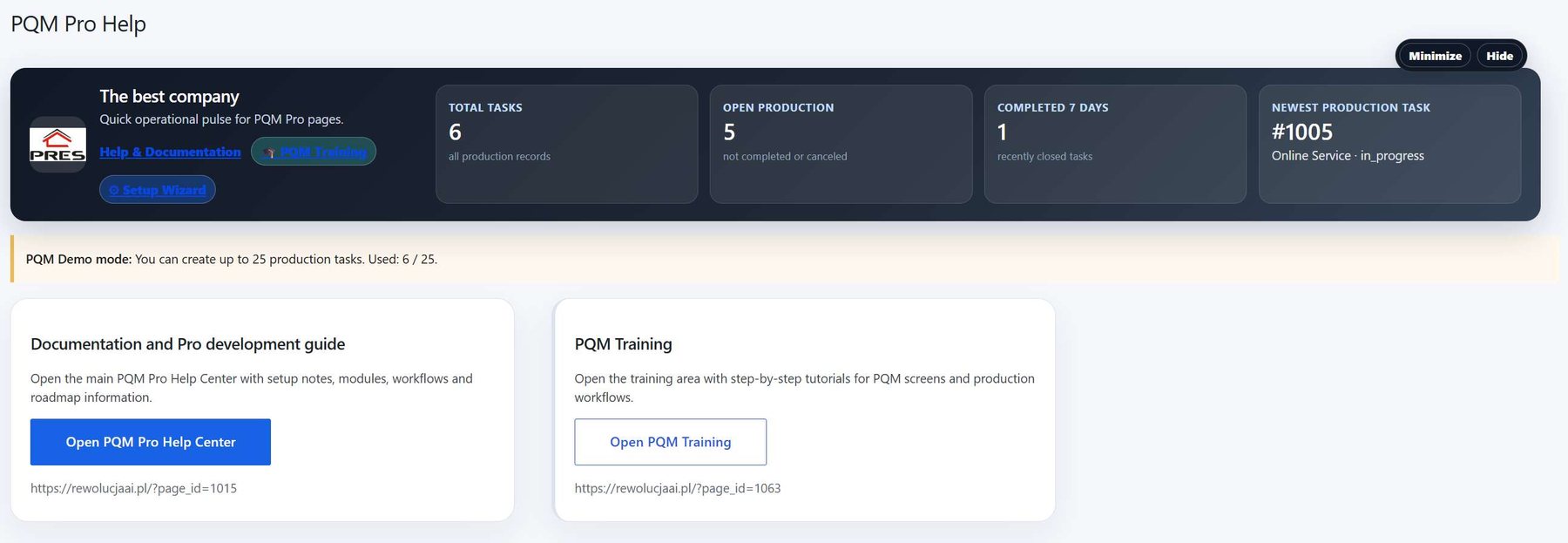
Help and Training screen
Help area reference. Use it to explain where users can find support, documentation and training resources.
Who should use this screen?
AdministratorConfigures PQM, licenses, modules, health checks, capabilities and technical maintenance. This role should be limited to trusted users.
Manager / Shop ManagerControls daily production, creates tasks, checks reports, follows deadlines and supervises employee work without changing technical settings.
Production EmployeeWorks mainly in the frontend Employee Portal and updates assigned production stages without using the WordPress admin area.
Troubleshooting for beginners
| Symptom | Simple explanation | What to check first |
|---|---|---|
| The page looks empty | The system may have no demo data yet, or the current user may not have access to the required role/capability. | Create one test task, assign a department, then refresh the screen. Also check the user role. |
| A button opens a login page or My Account | The visitor is not logged in or the page is using a frontend-safe route that requires authentication. | Log in with a test user that has the expected role. Check whether the shortcode/page is visible only to logged-in users. |
| Data exists but does not appear in a report/chart | Filters, date range, status rules or completion dates may exclude the task. | Clear filters, expand the date range and verify that the task has the status/date required by the report. |
| Something changed but the screen still shows old data | Browser cache, WordPress cache or AJAX response cache may show old information. | Refresh the page, clear cache for this page and test in an incognito window before debugging code. |
| The layout is broken on a small screen | Wide tables and timelines need horizontal space; this is normal if the content remains readable. | Use the mobile breakpoint, keep cards in one column and allow horizontal scroll only inside tables/timelines. |
Readiness checklist
A beginner can explain what this screen is for after reading the first two sections.
The correct role can open the screen and restricted roles cannot see unsafe actions.
There is at least one realistic test task visible in the screen.
Buttons and links go to the expected place.
The empty state explains what to do next instead of looking broken.
The page remains readable on tablet and mobile.
Related training pages
Training HomeTraining overview and recommended learning path.Production DashboardDaily command center, active tasks, metrics and quick actions.Core ConfigurationSystem settings, statuses, roles, capabilities and safe defaults.Tasks and Add TaskHow to create, read and update production tasks step by step.Departments and WorkflowHow production stages and responsibilities are modeled.Calendar and Standard GanttDate planning, deadlines and visual timeline overview.Email Queue and CommunicationCustomer messages, email queue and communication templates.Reports and KPIKPI, margins, bottlenecks, exports and production analysis.