
Licencja szkoleniowa PQM
Szkolenie PQM / License and Demo Mode
Activation
License and Demo Mode
Understand license activation, demo mode, expiration, domain binding and module entitlements.
Production OSWordPress CoreRole-based workflowTraining Center
Training pages
Training HomeProduction DashboardCore ConfigurationTasks and Add TaskDepartments and WorkflowCalendar and Standard GanttEmail Queue and CommunicationReports and KPIModules / MarketplaceSetup WizardLicense and Demo ModeHelp and TrainingAdmin PanelClient PanelEmployee Worker PortalShop Manager / SupervisorImplementation Checklist
Purpose in plain language
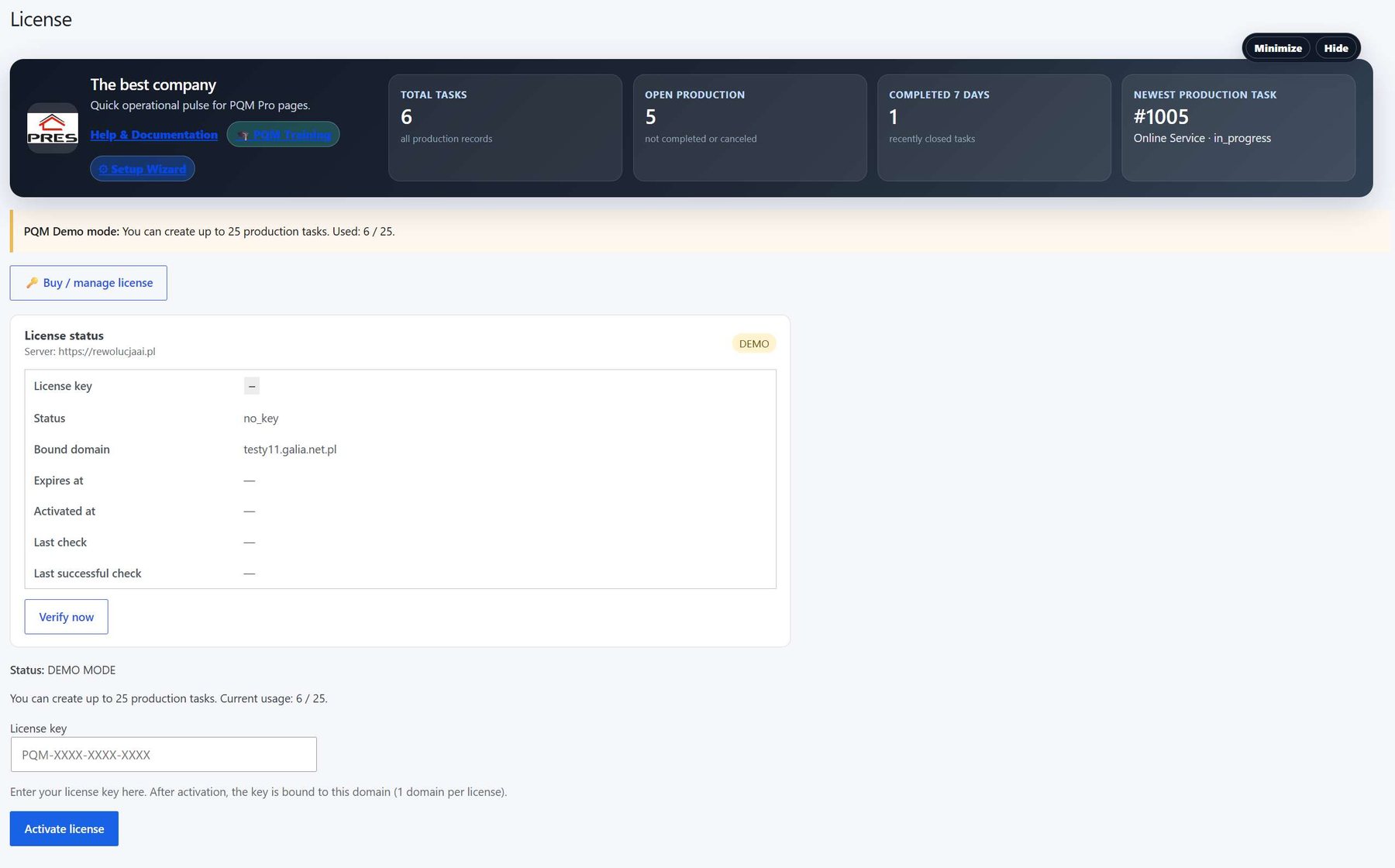
The License and Demo Mode screen tells the site what edition and modules are allowed to run. It protects commercial features, helps with updates and makes it clear whether the site is in demo, active, expired or limited mode.
For a beginner, this screen answers: is PQM activated on this domain, what plan/modules are available, and what happens when the license expires?
Where to click
Log in as administrator.
Open PQM → License or Admin Panel → license section.
Paste the license key if activation is required.
Click Activate, Verify or Refresh license depending on the interface.
After activation, check active modules and expiration/support dates.
License fields explained
| Field | Meaning | What to do |
|---|---|---|
| License key | Unique code assigned to customer/site. | Paste exactly as provided. Avoid spaces before/after. |
| Status | Active, inactive, expired, invalid, demo or grace period. | If not active, check key, domain and server communication. |
| Domain / site URL | Website bound to the license. | Check staging vs production domain carefully. |
| Expiration date | End of subscription, updates or support depending on product rules. | Renew before expiration if production depends on paid features. |
| Modules / entitlements | Which paid modules this license can activate. | Use Marketplace/Admin Panel to verify that modules match purchased plan. |
| Last check | When the site last contacted the license server. | If old, click refresh or check server/firewall/API connectivity. |
Activation step by step
Copy the license key from the customer account, email or license server.
Paste it into the license field on the WordPress site.
Click activation/verify button once and wait for response.
Read the result message. Do not assume failed activation is a plugin bug; it may be wrong domain, expired key or connectivity issue.
Open Modules / Marketplace and confirm that purchased modules are available.
Refresh admin menu and open one licensed module page.
Demo Mode explained
Demo Mode should let a potential customer see PQM without confusing them about what is fully licensed. It may limit modules, features, records, updates or commercial functionality depending on product strategy.
| Mode | Meaning | Recommended user message |
|---|---|---|
| Free / directory version | Core/free features work without commercial Pro license. | “You can run basic workflow and upgrade when you need advanced modules.” |
| Demo / trial | Temporary or limited access for evaluation. | “Use demo data and test the workflow before buying.” |
| Pro active | Main paid core is activated. | “Production features are active on this site.” |
| Module entitlement | Specific module is allowed under the license. | “This module can be installed/activated because it belongs to the license.” |
| Expired / invalid | License check failed or time ended. | “Renew or contact support. Existing data should remain safe, but paid updates/features may be limited.” |
Good practice
- Keep license messages human-readable. A customer should not see only raw API errors.
- Clearly distinguish core license from module entitlements.
- Show active domain and expiration date so support can diagnose quickly.
- Do not hide existing production data when a license expires. Limit features safely and explain renewal.
Screenshot reference
How to use screenshots
Click any screenshot to open it in a new tab. This is useful for zooming in while following the step-by-step instructions.
License and Demo Mode
License screen reference. Use it to explain activation, demo mode, expiration and module entitlements.
Who should use this screen?
AdministratorConfigures PQM, licenses, modules, health checks, capabilities and technical maintenance. This role should be limited to trusted users.
Manager / Shop ManagerControls daily production, creates tasks, checks reports, follows deadlines and supervises employee work without changing technical settings.
Production EmployeeWorks mainly in the frontend Employee Portal and updates assigned production stages without using the WordPress admin area.
Troubleshooting for beginners
| Symptom | Simple explanation | What to check first |
|---|---|---|
| The page looks empty | The system may have no demo data yet, or the current user may not have access to the required role/capability. | Create one test task, assign a department, then refresh the screen. Also check the user role. |
| A button opens a login page or My Account | The visitor is not logged in or the page is using a frontend-safe route that requires authentication. | Log in with a test user that has the expected role. Check whether the shortcode/page is visible only to logged-in users. |
| Data exists but does not appear in a report/chart | Filters, date range, status rules or completion dates may exclude the task. | Clear filters, expand the date range and verify that the task has the status/date required by the report. |
| Something changed but the screen still shows old data | Browser cache, WordPress cache or AJAX response cache may show old information. | Refresh the page, clear cache for this page and test in an incognito window before debugging code. |
| The layout is broken on a small screen | Wide tables and timelines need horizontal space; this is normal if the content remains readable. | Use the mobile breakpoint, keep cards in one column and allow horizontal scroll only inside tables/timelines. |
Readiness checklist
A beginner can explain what this screen is for after reading the first two sections.
The correct role can open the screen and restricted roles cannot see unsafe actions.
There is at least one realistic test task visible in the screen.
Buttons and links go to the expected place.
The empty state explains what to do next instead of looking broken.
The page remains readable on tablet and mobile.
Related training pages
Training HomeTraining overview and recommended learning path.Production DashboardDaily command center, active tasks, metrics and quick actions.Core ConfigurationSystem settings, statuses, roles, capabilities and safe defaults.Tasks and Add TaskHow to create, read and update production tasks step by step.Departments and WorkflowHow production stages and responsibilities are modeled.Calendar and Standard GanttDate planning, deadlines and visual timeline overview.Email Queue and CommunicationCustomer messages, email queue and communication templates.Reports and KPIKPI, margins, bottlenecks, exports and production analysis.