
Szkolenie PQM Pracownik
Szkolenie PQM / Employee Worker Portal
Worker Portal
Employee Worker Portal
Frontend workspace where employees see assigned work, read instructions and update their production stage.
Production OSWordPress CoreRole-based workflowTraining Center
Training pages
Training HomeProduction DashboardCore ConfigurationTasks and Add TaskDepartments and WorkflowCalendar and Standard GanttEmail Queue and CommunicationReports and KPIModules / MarketplaceSetup WizardLicense and Demo ModeHelp and TrainingAdmin PanelClient PanelEmployee Worker PortalShop Manager / SupervisorImplementation Checklist
Purpose in plain language
Employee Worker Portal is the frontend workspace for production workers. It should show each worker what they need to do without exposing the full WordPress admin area. A worker should see assigned tasks, update their stage, add production notes and confirm work progress.
For a beginner, this portal answers: what is my work, what should I do next, and how do I mark it correctly?
Where to click / how worker opens it
Create a WordPress page for the Employee Portal if the plugin uses shortcodes/pages.
Paste the correct employee/worker portal shortcode or block.
Assign the user to worker role and/or department according to your PQM configuration.
Worker logs in and opens the portal page.
Worker clicks a task assigned to their department and updates the stage/status after real work is done.
Worker Portal areas
| Area | What it means | How worker uses it |
|---|---|---|
| My tasks | Tasks assigned to the worker or worker’s department. | Start here every shift. |
| Task details | Production instructions, customer-safe summary, files and notes. | Read before starting work. |
| Status/stage action | Button or select field to update progress. | Change only when the physical work state changes. |
| Production note | Short note from worker about work done or problem found. | Use for facts: “file missing”, “material shortage”, “finished 200 pcs”. |
| Department filter | Shows tasks for relevant department. | Useful when a worker belongs to more than one stage. |
Worker daily workflow
Log in and open Employee Portal.
Check tasks assigned to your department.
Open the highest priority or nearest deadline task first.
Read production notes and files before starting work.
If information is missing, add a note or ask manager before guessing.
After finishing your part, update the status/stage according to company rules.
Add a short note if something important happened: delay, defect, missing file, partial completion.
What a worker should not do
| Do not… | Why | Better action |
|---|---|---|
| Use administrator account for normal work | Breaks accountability and exposes dangerous settings. | Use named worker account. |
| Mark task completed if only your department is finished | Other stages may still need to work. | Move to next stage or mark your stage done. |
| Ignore missing information | Wrong production causes waste and complaints. | Add note and ask manager/customer service. |
| Write private comments in customer-visible areas | Customers may see inappropriate/internal text. | Use internal notes when available. |
Good practice
- Make portal buttons large and clear for production environments.
- Use department assignment so workers see only relevant tasks.
- Train employees to update PQM immediately after real production change, not at the end of the week.
- Keep worker instructions practical and direct. They should not read a long manual before every task.
Screenshot reference
How to use screenshots
Click any screenshot to open it in a new tab. This is useful for zooming in while following the step-by-step instructions.
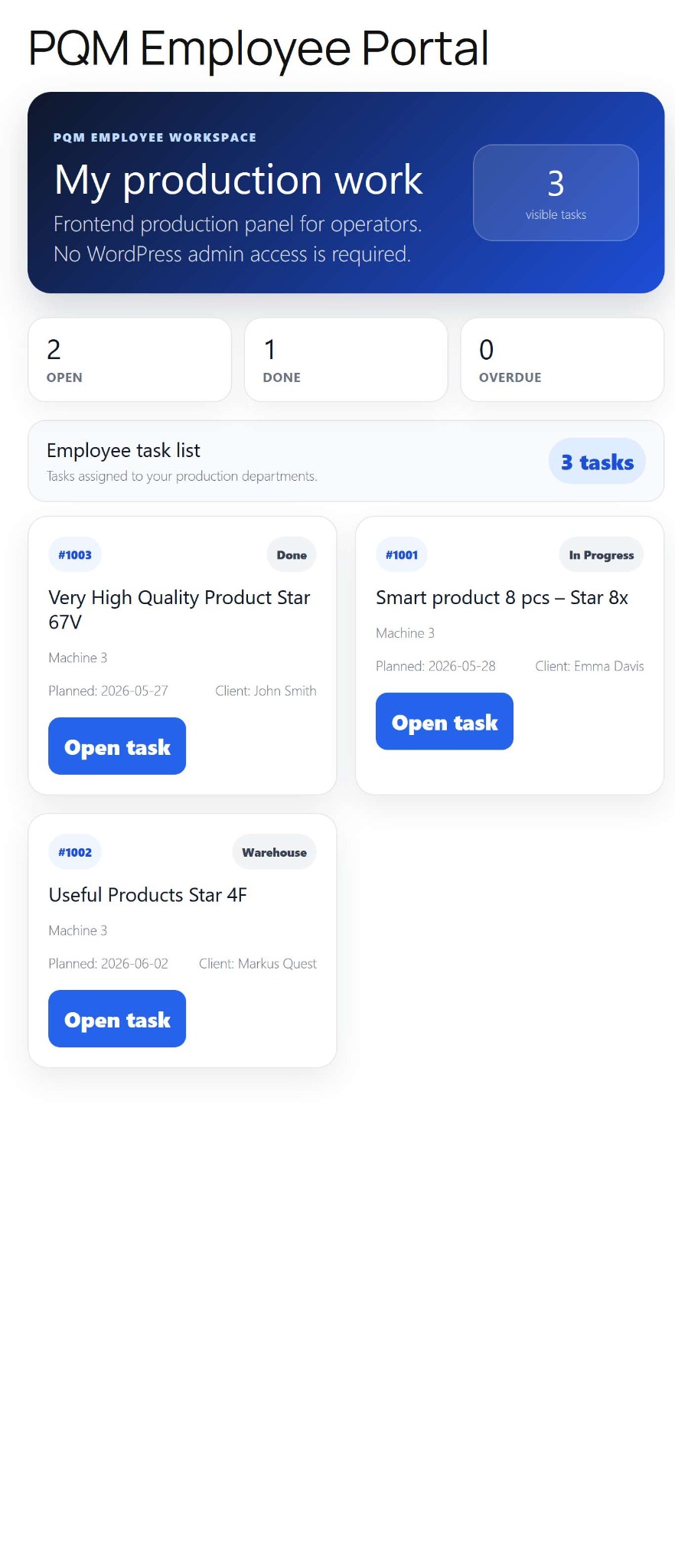
Employee Worker Portal
Worker portal reference. Use it to explain how employees see assigned tasks and update production progress.
Troubleshooting for beginners
| Symptom | Simple explanation | What to check first |
|---|---|---|
| The page looks empty | The system may have no demo data yet, or the current user may not have access to the required role/capability. | Create one test task, assign a department, then refresh the screen. Also check the user role. |
| A button opens a login page or My Account | The visitor is not logged in or the page is using a frontend-safe route that requires authentication. | Log in with a test user that has the expected role. Check whether the shortcode/page is visible only to logged-in users. |
| Data exists but does not appear in a report/chart | Filters, date range, status rules or completion dates may exclude the task. | Clear filters, expand the date range and verify that the task has the status/date required by the report. |
| Something changed but the screen still shows old data | Browser cache, WordPress cache or AJAX response cache may show old information. | Refresh the page, clear cache for this page and test in an incognito window before debugging code. |
| The layout is broken on a small screen | Wide tables and timelines need horizontal space; this is normal if the content remains readable. | Use the mobile breakpoint, keep cards in one column and allow horizontal scroll only inside tables/timelines. |
Readiness checklist
A beginner can explain what this screen is for after reading the first two sections.
The correct role can open the screen and restricted roles cannot see unsafe actions.
There is at least one realistic test task visible in the screen.
Buttons and links go to the expected place.
The empty state explains what to do next instead of looking broken.
The page remains readable on tablet and mobile.
Related training pages
Training HomeTraining overview and recommended learning path.Production DashboardDaily command center, active tasks, metrics and quick actions.Core ConfigurationSystem settings, statuses, roles, capabilities and safe defaults.Tasks and Add TaskHow to create, read and update production tasks step by step.Departments and WorkflowHow production stages and responsibilities are modeled.Calendar and Standard GanttDate planning, deadlines and visual timeline overview.Email Queue and CommunicationCustomer messages, email queue and communication templates.Reports and KPIKPI, margins, bottlenecks, exports and production analysis.