
Kierownik sklepu szkoleniowego PQM
Szkolenie PQM / Shop Manager / Supervisor Portal
Supervisor View
Shop Manager / Supervisor Portal
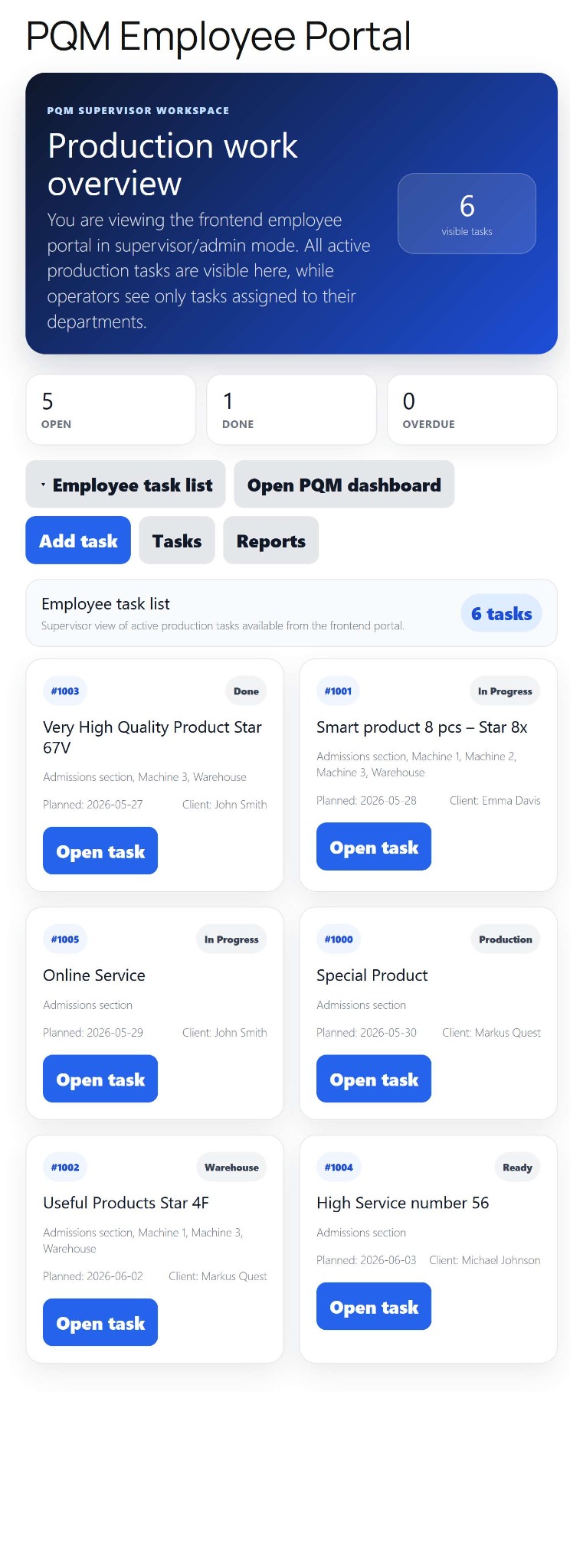
Operational view for managers who supervise daily production without changing technical settings.
Production OSWordPress CoreRole-based workflowTraining Center
Training pages
Training HomeProduction DashboardCore ConfigurationTasks and Add TaskDepartments and WorkflowCalendar and Standard GanttEmail Queue and CommunicationReports and KPIModules / MarketplaceSetup WizardLicense and Demo ModeHelp and TrainingAdmin PanelClient PanelEmployee Worker PortalShop Manager / SupervisorImplementation Checklist
Purpose in plain language
Shop Manager / Supervisor Portal is a frontend or simplified management view for people who supervise production but should not necessarily change technical settings. It helps a manager see open work, deadlines, department pressure and quick links to important actions.
For a beginner, the supervisor view is a bridge between full WordPress admin and worker portal. It is safer than giving everyone administrator access, but stronger than the worker screen.
Where to click
Create or open the supervisor/shop manager page if using frontend portals.
Log in as a user with shop manager/supervisor role.
Open the portal from site menu, dashboard shortcut or account area.
Use summary cards first, then open filtered task lists or reports.
Escalate configuration/license/module problems to administrator instead of changing technical settings directly.
Supervisor screen map
| Area | Purpose | Supervisor action |
|---|---|---|
| Open tasks | Shows current work needing attention. | Check priorities and deadlines. |
| Department overview | Shows workload by stage/team. | Identify bottlenecks and overloaded departments. |
| Late / urgent tasks | Highlights risk. | Open task, assign responsibility or contact customer service. |
| Quick actions | Links to add task, task list, calendar, reports or dashboard. | Use as operational navigation. |
| Messages / alerts | Shows communication or system warnings relevant to production. | Respond or route to correct person. |
Supervisor daily routine
Open supervisor portal at the beginning of shift.
Check late and urgent tasks first.
Check department workload and decide where the team should focus.
Open the calendar/Gantt if the day looks overloaded.
Assign or reassign tasks when responsibility is unclear.
At the end of shift, confirm which tasks moved forward and which must be escalated.
What supervisor should and should not control
| Area | Supervisor can usually do | Admin should do |
|---|---|---|
| Tasks | Create, open, update priority/status, assign departments if allowed. | Change database/technical behavior. |
| Reports | View operational reports and exports. | Change report SQL/settings if technical. |
| Workers | Monitor assigned work and progress. | Create global roles/capabilities. |
| Modules | Use active module screens. | Install, activate, update or license modules. |
| Settings | Maybe limited operational preferences. | Core configuration, health, Code Guard, license, migrations. |
Good practice
- Use supervisor portal to avoid giving WordPress administrator access to daily managers.
- Make urgent tasks visually obvious.
- Keep quick links practical: Add Task, Tasks, Calendar, Reports, Dashboard.
- Train supervisors to fix unclear task ownership quickly.
Screenshot reference
How to use screenshots
Click any screenshot to open it in a new tab. This is useful for zooming in while following the step-by-step instructions.
Shop Manager / Supervisor
Shop manager reference. Use it to explain supervisor workflow, daily checks and production control.
Who should use this screen?
AdministratorConfigures PQM, licenses, modules, health checks, capabilities and technical maintenance. This role should be limited to trusted users.
Manager / Shop ManagerControls daily production, creates tasks, checks reports, follows deadlines and supervises employee work without changing technical settings.
Production EmployeeWorks mainly in the frontend Employee Portal and updates assigned production stages without using the WordPress admin area.
Troubleshooting for beginners
| Symptom | Simple explanation | What to check first |
|---|---|---|
| The page looks empty | The system may have no demo data yet, or the current user may not have access to the required role/capability. | Create one test task, assign a department, then refresh the screen. Also check the user role. |
| A button opens a login page or My Account | The visitor is not logged in or the page is using a frontend-safe route that requires authentication. | Log in with a test user that has the expected role. Check whether the shortcode/page is visible only to logged-in users. |
| Data exists but does not appear in a report/chart | Filters, date range, status rules or completion dates may exclude the task. | Clear filters, expand the date range and verify that the task has the status/date required by the report. |
| Something changed but the screen still shows old data | Browser cache, WordPress cache or AJAX response cache may show old information. | Refresh the page, clear cache for this page and test in an incognito window before debugging code. |
| The layout is broken on a small screen | Wide tables and timelines need horizontal space; this is normal if the content remains readable. | Use the mobile breakpoint, keep cards in one column and allow horizontal scroll only inside tables/timelines. |
Readiness checklist
A beginner can explain what this screen is for after reading the first two sections.
The correct role can open the screen and restricted roles cannot see unsafe actions.
There is at least one realistic test task visible in the screen.
Buttons and links go to the expected place.
The empty state explains what to do next instead of looking broken.
The page remains readable on tablet and mobile.
Related training pages
Training HomeTraining overview and recommended learning path.Production DashboardDaily command center, active tasks, metrics and quick actions.Core ConfigurationSystem settings, statuses, roles, capabilities and safe defaults.Tasks and Add TaskHow to create, read and update production tasks step by step.Departments and WorkflowHow production stages and responsibilities are modeled.Calendar and Standard GanttDate planning, deadlines and visual timeline overview.Email Queue and CommunicationCustomer messages, email queue and communication templates.Reports and KPIKPI, margins, bottlenecks, exports and production analysis.